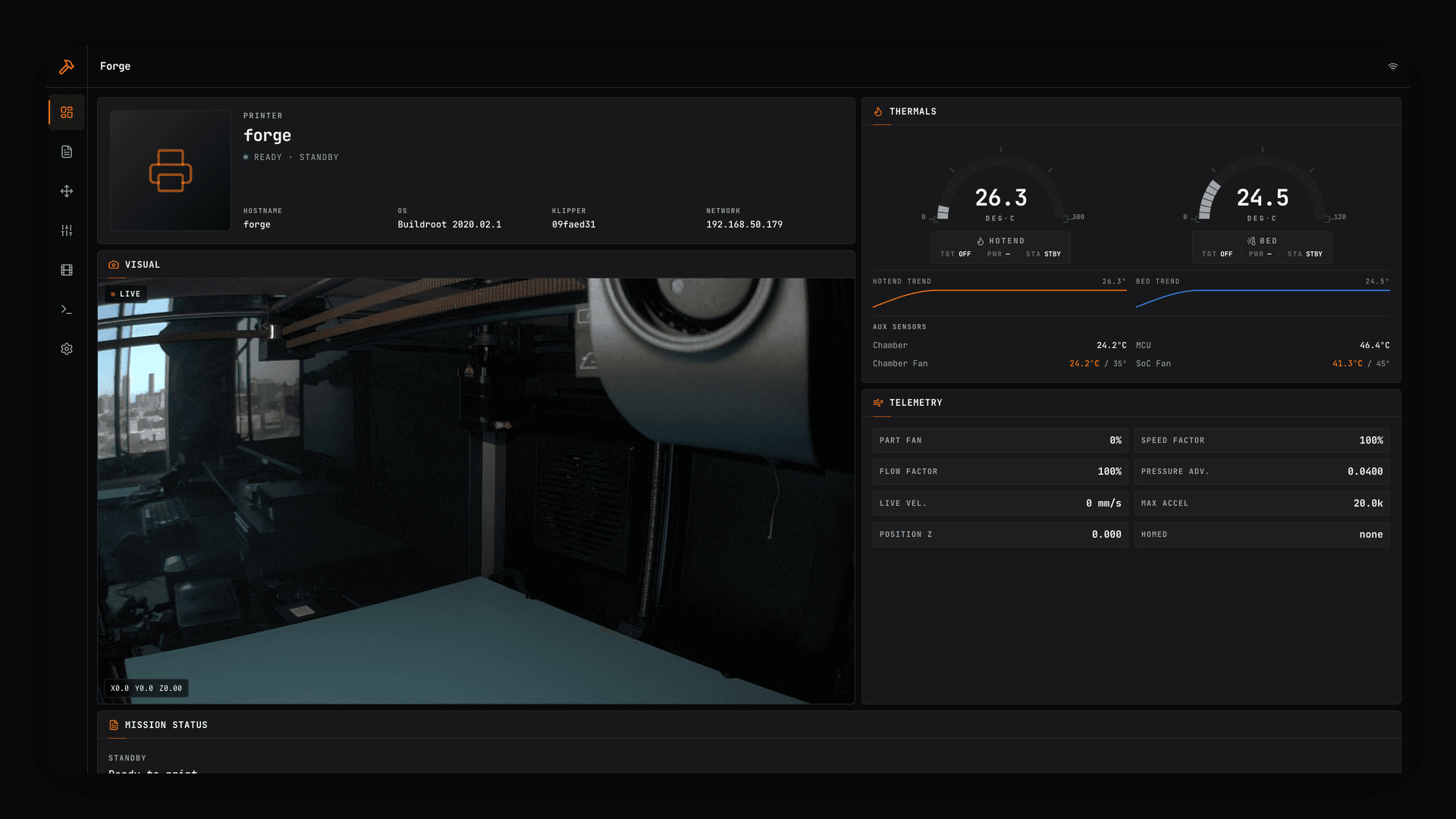
A modern, opinionated web interface for Klipper-based 3D printers — built for ease of use, with foolproofing wired in at every step. Replaces Fluidd on a Creality K1 Max with a mission-control dashboard, calibration tooling, and explicit guard-rails that prevent accidental moves, mid-print misclicks, and out-of-bounds commands.
Screenshots

How it works
The UI is a static React SPA that talks directly to Moonraker over a single WebSocket. There is no backend service to maintain — drop the built bundle anywhere nginx can serve static files. State subscriptions are merged into immutable snapshots so React renders only what changed. WebSocket recovery uses bounded backoff. The camera retries only after a real stream error, avoiding false MJPEG reconnect loops, and always offers a manual refresh control.
Printer actions use a shared typed safety boundary with current-state checks, duplicate prevention, and clear errors. Print start re-checks state after confirmation and again after setup. Control blocks unhomed, busy, or out-of-bounds moves with a 0.5 mm endstop buffer. Expert Console access stays available, but hardware-changing and unknown commands are classified and confirmed. Tune macros and pressure-advance writes use the same live-state runner and duplicate lock.
Calibration tasks are exposed as one-click cards with explicit confirm modals, estimated durations, and the literal G-code preview behind a <details>. Print confirmation includes a physical-area checklist and optional adaptive bed mesh (KAMP); a setup error blocks print start instead of silently continuing. Print History surfaces the rolling Moonraker job log with success/failure pills and per-print stats.
Stack
- React 19 + TypeScript on Bun + Vite
- Tailwind v4 with CSS-driven theming (8 accent presets, configurable device name)
- Lucide icons in the Radix stroke aesthetic
- Dependency-free SVG temperature trends and custom segmented thermal gauges
- No backend — pure static SPA against Moonraker's WebSocket + REST API
Status
Active
Install for local development
Requirements: macOS or Linux, Bun, Git, and a Klipper printer reachable through Moonraker.
git clone https://github.com/thekozugroup/Regolith.git
cd Regolith
bun install
bun run dev
Open the local URL printed by Vite. Development defaults to forge.local; no source edit is needed. To use another trusted LAN hostname or IPv4 address:
cp .env.example .env.local
Edit only VITE_REGOLITH_PRINTER_HOST in .env.local, then start Vite. Values containing a protocol, port, path, shell syntax, or invalid IPv4 address are rejected before the server starts. Vite proxies /printer, /server, /machine, /access, /api, /webcam, and /websocket to that validated host. The camera uses the same host in development.
Safely install on the printer
Regolith targets forge.local by default. The deployment changes static web files only under /usr/data; it does not send G-code, move axes, heat components, edit printer configuration, or restart services.
Before you start: SSH keys
SSH into your printer once and install a key. Keys are the supported way in; everything below assumes they work:
ssh root@forge.local          # accept and verify the printer's identity
ssh-copy-id root@forge.local  # deploys are passwordless from here on
If a key is unavailable, deploy.sh falls back to a silent password prompt or PRINTER_PASSWORD through sshpass -e, so the secret never reaches process arguments. That path is a fallback, not the intended setup.
Any Klipper printer
Nothing in the deployment is specific to a K1 Max — the defaults just happen to match one. Four environment variables describe where your printer keeps its WebUI:
| Variable | Default | What it is |
|---|---|---|
PRINTER_HOST | forge.local | Hostname or LAN address of the printer |
PRINTER_USER | root | SSH account on the printer |
FLUIDD_ROOT | /usr/data | Writable data root the WebUI lives under |
WEBUI_DIR | fluidd | Directory nginx serves, inside FLUIDD_ROOT |
So a printer serving its WebUI from /home/pi/mainsail as user pi:
PRINTER_HOST=voron.local PRINTER_USER=pi FLUIDD_ROOT=/home/pi WEBUI_DIR=mainsail ./deploy.sh --preflight
Every remote path — staging slot, previous slot, upload archive, and backups — is derived from those two path values, and all four are validated before a single remote command runs. Machine-specific behaviour (pins, axis limits, macros, tell-tales) is not set here: that lives in a Regolith profile under src/profiles.
The rest of this section uses the defaults for brevity; substitute your own values throughout.
Guided setup on macOS
The simplest path is the guided setup. In Finder, double-click Install Regolith.command, or run:
bash "Install Regolith.command"
Choose Check only first. It is read-only and is the default if you press Return. After it passes, run the setup again and choose Install. Install uses the same conclusive idle checks, local tests, verified backup, atomic swap, HTTP verification, and automatic rollback described below. Roll Back restores the previous verified WebUI slot and is also idle-gated.
The guided setup checks for SSH, curl, and Bun. It discovers the printer's ECDSA fingerprint before authentication. A saved identity must match exactly; a first-time identity must be confirmed interactively. It never stores the printer password. If SSH keys are unavailable, sshpass is still required for the silent password fallback.
Command-line equivalents are also available:
bash "Install Regolith.command" --check
bash "Install Regolith.command" --install
bash "Install Regolith.command" --rollback
Manual install
Verify SSH access first, as described under Before you start above. If key authentication is unavailable, install sshpass from a trusted package manager. Then either let the script ask for the printer password silently or provide it through the environment. The script uses sshpass -e; the password never appears in process arguments.
Optional environment flow (input stays hidden and does not enter shell history):
read -r -s PRINTER_PASSWORD
export PRINTER_PASSWORD
./deploy.sh --preflight
unset PRINTER_PASSWORD
Run the read-only preflight first:
./deploy.sh --preflight
Preflight refuses to continue unless all printer state fields are present, Klipper is ready, no print or calibration is active, virtual SD is inactive, $FLUIDD_ROOT/$WEBUI_DIR exists, required remote tools exist, and at least 32 MB is free. It does not change remote files. A "Remote preflight failed" message usually means FLUIDD_ROOT/WEBUI_DIR do not match where this printer actually serves its WebUI.
Deploy after preflight passes:
./deploy.sh
The command installs locked local dependencies, runs lint and all tests, builds, then:
- Uploads a release archive and verifies byte size plus SHA-256.
- Extracts to
/usr/data/fluidd.nextand compares its complete file list with localdist/. - Creates and verifies a timestamped backup under
/usr/data/regolith-backups, then retains the newest five verified archives. A malformed archive blocks deployment before the live UI changes. - Atomically moves the current UI to
/usr/data/fluidd.previousand activates the staged UI. - HTTP-checks the HTML and every referenced asset.
- Automatically swaps the previous UI back and verifies recovery if any post-swap check fails.
Use another trusted LAN hostname only when needed:
PRINTER_HOST=k1max.local ./deploy.sh --preflight
PRINTER_HOST=k1max.local ./deploy.sh
Host, user, and path values are validated before any command runs. SSH uses the system known-hosts file with StrictHostKeyChecking=accept-new; an existing changed host key is rejected.
If the printer refuses an SSH session mid-run — dropbear does this occasionally under memory pressure — read-only and idempotent steps retry up to twice with a short backoff. Steps that mutate the live slot (backup, atomic swap, rollback swap) are never retried; they fail closed so a lost acknowledgement can never be replayed.
Roll back
Rollback is also idle-gated and HTTP-verified:
./deploy.sh --rollback
This swaps the live slot and <live>.previous, so the operation remains reversible. Pass the same PRINTER_HOST, PRINTER_USER, FLUIDD_ROOT, and WEBUI_DIR you deployed with; a successful deploy prints the exact rollback command to reuse. If the selected previous slot fails HTTP verification, the script restores the original slot and verifies recovery.
Browser regression testing
The repository includes printer-isolated Playwright coverage:
bunx playwright install chromium
bun run test:e2e
The suite serves a synthetic idle K1 state, intercepts every printer API and WebSocket request, blocks external traffic, and fails if the UI attempts a printer write. It covers Basic and Expert modes at phone and desktop widths, card/layout integrity, minimum touch targets, healthy-camera stability, manual camera refresh, and stale-update recovery. It never requires or contacts a real printer.
Software updates and recovery
Creality software updates often preserve /usr/data, so Regolith keeps the previous slot and timestamped backups there. This is best-effort, not a guarantee: a firmware image may erase /usr/data, replace nginx routing, or change Moonraker behavior.
Before a printer software update, confirm backups exist:
ssh root@forge.local 'ls -lh /usr/data/regolith-backups /usr/data/fluidd.previous'
After an update, run ./deploy.sh --preflight. Deploy again only if the printer is conclusively idle and the preflight still passes. Never treat a successful static deployment as proof that firmware or printer configuration survived.